Sibeesh Passion

Top Menu

  • Home
  • Search
  • About
  • Privacy Policy

Main Menu

  • Articles
    • Azure
    • .NET
    • IoT
    • JavaScript
    • Career Advice
    • Interview
    • Angular
    • Node JS
    • JQuery
    • Knockout JS
    • Jasmine Framework
    • SQL
    • MongoDB
    • MySQL
    • WordPress
  • Contributions
    • Medium
    • GitHub
    • Stack Overflow
    • Unsplash
    • ASP.NET Forum
    • C# Corner
    • Code Project
    • DZone
    • MSDN
  • Social Media
    • LinkedIn
    • Facebook
    • Instagram
    • Twitter
  • YouTube
    • Sibeesh Venu
    • Sibeesh Passion
  • Awards
  • Home
  • Search
  • About
  • Privacy Policy

logo

Sibeesh Passion

  • Articles
    • Azure
    • .NET
    • IoT
    • JavaScript
    • Career Advice
    • Interview
    • Angular
    • Node JS
    • JQuery
    • Knockout JS
    • Jasmine Framework
    • SQL
    • MongoDB
    • MySQL
    • WordPress
  • Contributions
    • Medium
    • GitHub
    • Stack Overflow
    • Unsplash
    • ASP.NET Forum
    • C# Corner
    • Code Project
    • DZone
    • MSDN
  • Social Media
    • LinkedIn
    • Facebook
    • Instagram
    • Twitter
  • YouTube
    • Sibeesh Venu
    • Sibeesh Passion
  • Awards
  • Linux Azure Function Isolated Dot Net 9 YAML Template Deployment

  • Build, Deploy, Configure CI &CD Your Static Website in 5 mins

  • Post Messages to Microsoft Teams Using Python

  • Get Azure Blob Storage Blob Metadata Using PowerShell

  • Deploy .net 6 App to Azure from Azure DevOps using Pipelines

Azure
Home›Azure›Validating Azure ARM Template Never Been Easier

Validating Azure ARM Template Never Been Easier
By SibeeshVenu
November 5, 2020
0
0
Share:

When you have many Azure resources to work with, and you are a lazy person who doesn’t want to create the resources one by one, that is when you should use the ARM templates, it is the Microsoft version of Infrastructure as a Code. It has many other advantages too, those are well documented here. Here in this post, we are going to see how you can validate your ARM template. As you might have already known that the ARM template is a JSON file, how difficult is it to validate a JSON file? Things get ugly when you have many resources to work with, there are chances that you miss some important properties, made some syntax issues, most importantly you might have not followed the best practices. So let’s dig in and see how to do this.

ARM Template Test Toolkit

The thing about most of the Cloud Providers is they usually provide all the tools that you may have to work with. The case with Microsoft is no different. We have a tool called ARM Template Toolkit and if you ask me, it is so easy to configure it.

Test Your ARM Template

We will be running some commands in PowerShell, and if you don’t have it in your system, now is the time. Now download the toolkit from this link. Open a PowerShell window and go to the downloaded folder and extract the same, once it is done cd into the folder “arm-ttk”. Now, this is where we are going to run all of our commands.

Get-ChildItem *.ps1, *.psd1, *.ps1xml, *.psm1 -Recurse | Unblock-File

Once it is done, we can import the required module.

Import-Module .\arm-ttk.psd1

There are high chances that you get an error as in the preceding image. This is because of the PowerShell execution policy. No worries, you can easily change the same.
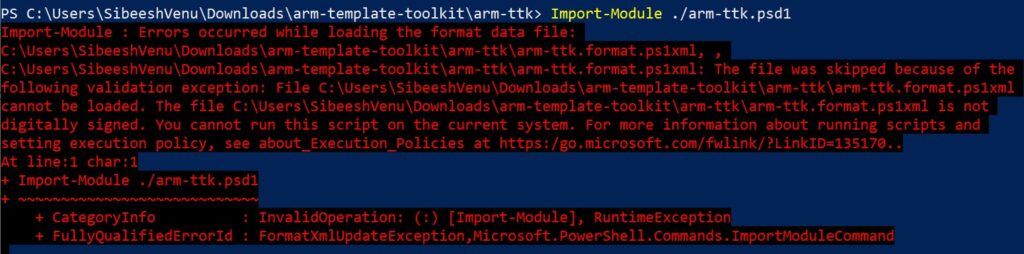
arm test tool kit import error

Now we let’s check what our Execution Policy is, and change it. We already have a post about the Execution Policies and reading it wouldn’t be a bad idea. For now, just run the command “Get-ExecutionPolicy” and “Get-ExecutionPolicy -List”.
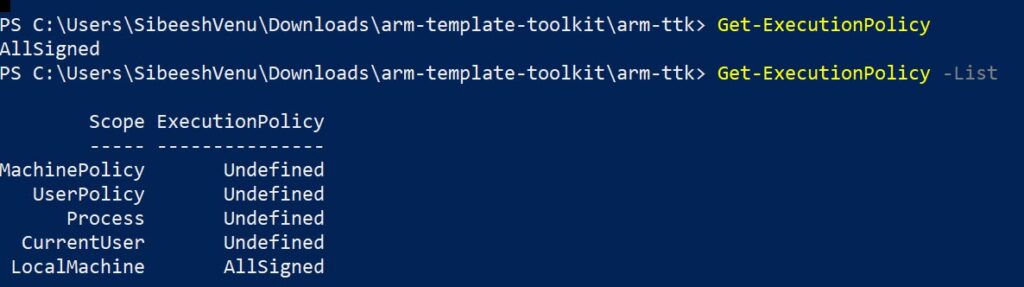
PowerShell execution policies

Now is the time to change the policy, I am going to change it to “ByPass”, so that nothing is blocked. And once that is done, run the Import command again.

change PowerShell execution policy

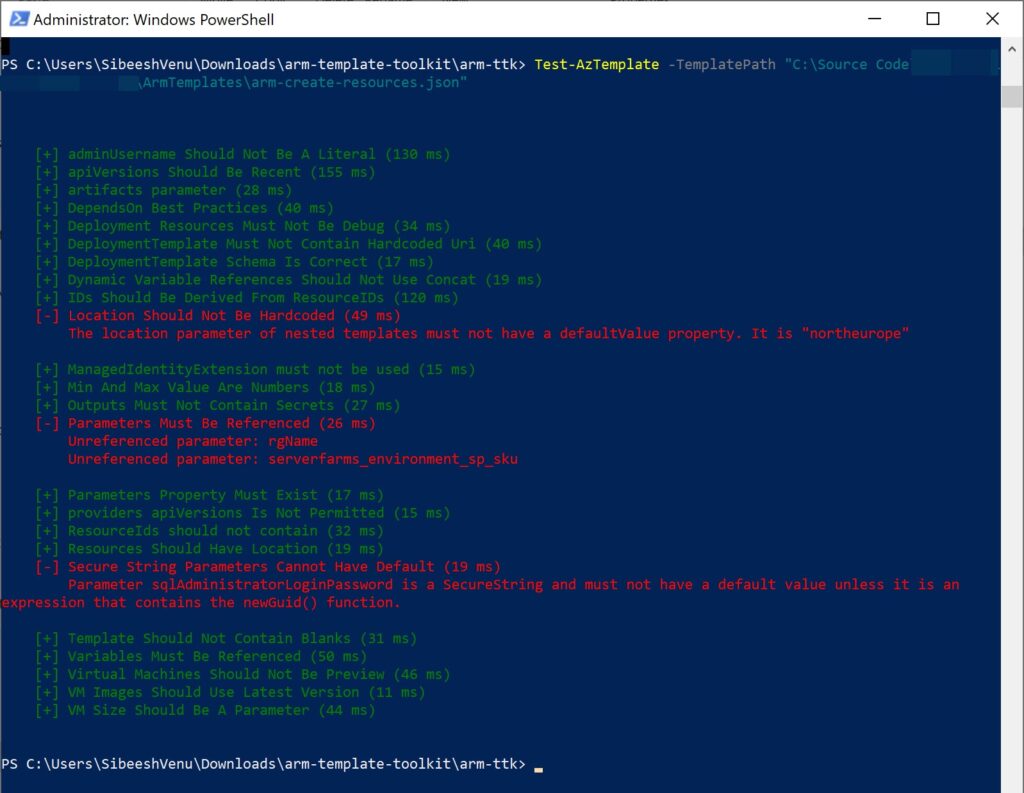
Runt the preceding command to validate the ARM template. Finally, yay!!!.

Test-AzTemplate -TemplatePath "C:\Source Code\ArmTemplates\arm-create-resources.json"         
test az arm template

As you can see that we get some errors in the red color, and fix them and run it again. Here is how your screen may look like now.
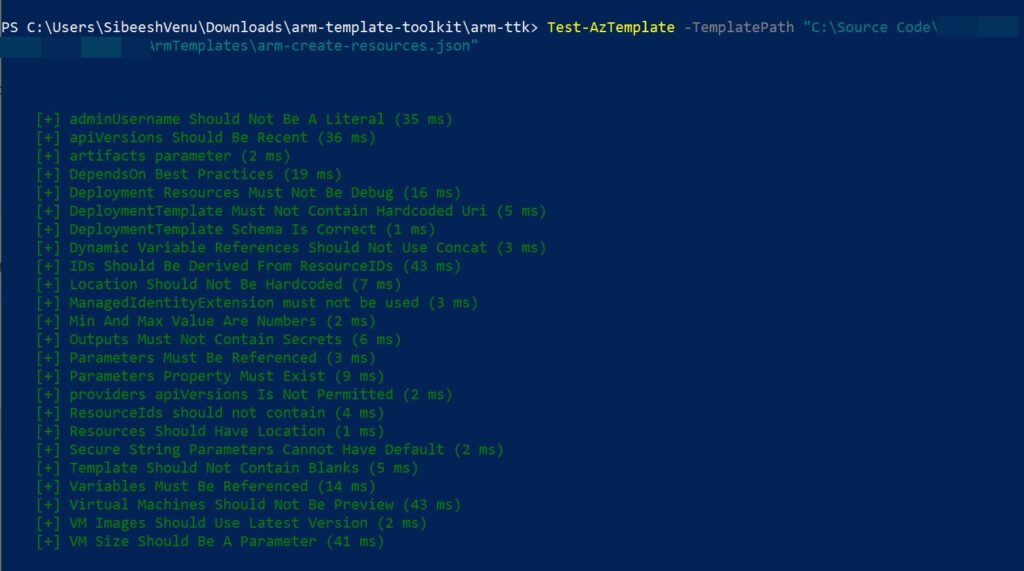
arm template validation success

ToDo

There are many other things that you can do with this tool. For example, integrate it with Azure pipeline and customize the tests, etc. You should be able to do those by reading this post, I wish all the very best.

Conclusion

Here in this post, we have seen how to validate our ARM templates, and this is critical especially when your ARM template is complex. Keep this in your mind whenever you work with ARM templates.

About the Author

I am yet another developer who is passionate about writing and video creation. I have written close to 500 blogs on my blog. And I upload videos on my YouTube channels Njan Oru Malayali and Sibeesh Passion. Please feel free to follow me.

  • GitHub
  • medium
  • Twitter

Your turn. What do you think?

Thanks a lot for reading. Did I miss anything that you may think which is needed in this article? Could you find this post useful? Kindly do not forget to share your feedback.

Kindest Regards

Sibeesh Venu
Tagsarm template best practicesarm template test toolkitarm templatesarm test toolAzureazure resource manager
Previous Article

GoPro Hero 9 With Front Display What ...

Next Article

Azure Multi-Stage Pipeline for Asp.Net Core and ...

0
Shares
  • 0
  • +
  • 0
  • 0
  • 0

SibeeshVenu

I am Sibeesh Venu, an engineer by profession and writer by passion. Microsoft MVP, Author, Speaker, Content Creator, Youtuber, Programmer.

Related articles More from author

  • Azure

    Secure Serverless Azure Functions AppSetting Using Key Vault

    July 5, 2019
    By SibeeshVenu
  • AzureHow to

    How to host a website in Azure

    June 1, 2015
    By SibeeshVenu
  • Back Up And Restore Your Old MySQL Database to New Database
    AzureDatabaseMySQLVirtual Machine

    Back Up your ClearDB and restore in Azure Virtual Machine MySQL

    September 18, 2015
    By SibeeshVenu
  • Send Custom Cryptocurrency MetaMask
    AzureBlockchain

    Create Your Own Cryptocurrency in Private Consortium Network Ethereum Azure Blockchain

    January 14, 2019
    By SibeeshVenu
  • Azure

    Azure DevOps Service Connection with Multiple Azure Resource Group

    November 19, 2021
    By SibeeshVenu
  • azure and azure devops automation dotnet 6.jpg
    Azure

    Deploy .net 6 App to Azure from Azure DevOps using Pipelines

    December 15, 2021
    By SibeeshVenu
0

My book

Asp Net Core and Azure with Raspberry Pi Sibeesh Venu

YouTube

MICROSOFT MVP (2016-2022)

profile for Sibeesh Venu - Microsoft MVP

Recent Posts

  • React Native Android Release with Azure DevOps and Google Play Store
  • Linux Azure Function Isolated Dot Net 9 YAML Template Deployment
  • Build, Deploy, Configure CI &CD Your Static Website in 5 mins
  • Easily move data from one COSMOS DB to another
  • .NET 8 New and Efficient Way to Check IP is in Given IP Range
  • Async Client IP safelist for Dot NET
  • Post Messages to Microsoft Teams Using Python
  • Get Azure Blob Storage Blob Metadata Using PowerShell
  • Deploy .net 6 App to Azure from Azure DevOps using Pipelines
  • Integrate Azure App Insights in 1 Minute to .Net6 Application

Tags

Achievements (35) Angular (14) Angular 5 (7) Angular JS (15) article (10) Article Of The Day (13) Asp.Net (14) Azure (65) Azure DevOps (10) Azure Function (10) Azure IoT (7) C# (17) c-sharp corner (13) Career Advice (11) chart (11) CSharp (7) CSS (7) CSS3 (6) HighChart (10) How To (9) HTML5 (10) HTML5 Chart (11) Interview (6) IoT (11) Javascript (10) JQuery (82) jquery functions (9) JQWidgets (15) JQX Grid (17) Json (7) Microsoft (8) MVC (20) MVP (9) MXChip (7) News (18) Office 365 (7) Products (10) SQL (20) SQL Server (15) Visual Studio (10) Visual Studio 2017 (7) VS2017 (7) Web API (12) Windows 10 (7) Wordpress (9)
  • .NET
  • Achievements
  • ADO.NET
  • Android
  • Angular
  • Arduino
  • Article Of The Day
  • ASP.NET
  • Asp.Net Core
  • Automobile
  • Awards
  • Azure
  • Azure CDN
  • azure devops
  • Blockchain
  • Blog
  • Browser
  • C-Sharp Corner
  • C#
  • Career Advice
  • Code Snippets
  • CodeProject
  • Cognitive Services
  • Cosmos DB
  • CSS
  • CSS3
  • Data Factory
  • Database
  • Docker
  • Drawings
  • Drill Down Chart
  • English
  • Excel Programming
  • Exporting
  • Facebook
  • Fun
  • Gadgets
  • GitHub
  • GoPro
  • High Map
  • HighChart
  • How to
  • HTML
  • HTML5
  • Ignite UI
  • IIS
  • Interview
  • IoT
  • JavaScript
  • JQuery
  • jQuery UI
  • JQWidgets
  • JQX Grid
  • Json
  • Knockout JS
  • Linux
  • Machine Learning
  • Malayalam
  • Malayalam Poems
  • MDX Query
  • Microsoft
  • Microsoft ADOMD
  • Microsoft MVP
  • Microsoft Office
  • Microsoft Technologies
  • Microsoft Windows
  • Microsoft Windows Server
  • Mobile
  • MongoDB
  • Monthly Winners
  • MVC
  • MVC Grid
  • MySQL
  • News
  • Node JS
  • npm
  • Number Conversions
  • October 2015
  • Office 365
  • Office Development
  • One Plus
  • Outlook
  • Page
  • PHP
  • Poems
  • PowerShell
  • Products
  • Q&A
  • Raspberry PI
  • React
  • SEO
  • SharePoint
  • Skype
  • Social Media
  • Software
  • Spire.Doc
  • Spire.PDF
  • Spire.XLS
  • SQL
  • SQL Server
  • SSAS
  • SSMS
  • Storage In HTML5
  • Stories
  • Third Party Software Apps
  • Tips
  • Tools
  • Translator Text
  • Uncategorized
  • Unit Testing
  • UWP
  • VB.Net
  • Videos
  • Virtual Machine
  • Visual Studio
  • Visual Studio 2017
  • Wamp Server
  • Web API
  • Web Platform Installer
  • Webinars
  • WebMatrix
  • Windows 10
  • Windows 7
  • Windows 8.1
  • Wordpress
  • Writing

ABOUT ME

I am Sibeesh Venu, an engineer by profession and writer by passion. Microsoft MVP, Author, Speaker, Content Creator, Youtuber, Programmer. If you would like to know more about me, you can read my story here.

Contact Me

  • info@sibeeshpassion.com

Pages

  • About
  • Search
  • Privacy Policy
  • About
  • Search
  • Privacy Policy
© Copyright Sibeesh Passion 2014-2025. All Rights Reserved.
Go to mobile version