Creating Custom Color Palette Using JQuery, HTML5, CSS
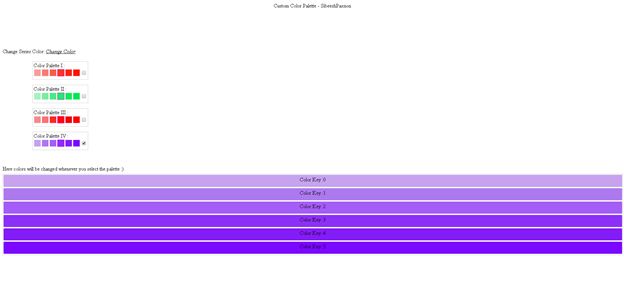
Today I came across a requirement to integrate a colour palette into my application. When I searched for that, unfortunately I could not find any solution . So I thought of creating a custom color palette tool. This article explains how to do this. I will use this tool in my high chart application. I hope you will like it. Please see the following image if you do not know what a colour palette is.
Background
I am working in a dashboard application, where you can find many charts, maps and grids and so on. If you work with a chart, you will definitely know the word series . Previously we were applying the color for every series separately, in other words the user must select the color for each series or it will take some default color. Your user may think this process is too much work. Here I am providing a custom color palette control.
Download Source Code
Why
Instead of applying colors separately, we can just select a palette so that the colors set in the selected palette will be applied automatically as in Excel.
Using the code
I am using jquery-1.9.1.js for the implementation in my application, you can get this file from the attached application.
Once you include the jQuery file, please create an HTML5 page as shown below.
[html]
<!DOCTYPE html>
<html xmlns="http://www.w3.org/1999/xhtml">
<head>
<title></title>
</head>
<body>
</body>
</html>
[/html]
Include the jQuery reference as in the following
[js]
<script src="jquery-1.9.1.js"></script>
[/js]
Now to replace our body tag as shown below
[html]
<body>
<header style="text-align:center"> Custom Color Palette – sibeeshpassion</header>
<br />
<br />
<br />
<br />
<br />
<br />
Change Series Color:
<label id="changecolor" title="Change Color"><u><i>Change Color</i></u></label>
<ul class="containerul">
<li>
<p class="boxcontainer">
Color Palette I :
<br />
<span class="simplebox" title="#F29F98" style="background-color: #F29F98"></span>
<span class="simplebox" title="#F27C72" style="background-color: #F27C72"></span>
<span class="simplebox" title="#F15C4E" style="background-color: #F15C4E"></span>
<span class="simplebox boxspecialone" title="#F03B2A" style="background-color: #F03B2A"></span>
<span class="simplebox" title="#F12815" style="background-color: #F12815"></span>
<span class="simplebox" title="#FF1601" style="background-color: #FF1601"></span>
<input type="checkbox" class="boxcheckbox" />
</p>
</li>
<li>
<p class="boxcontainer">
Color Palette II :
<br />
<span class="simplebox" title="#A3F0BE" style="background-color: #A3F0BE"></span>
<span class="simplebox" title="#7FEBA5" style="background-color: #7FEBA5"></span>
<span class="simplebox" title="#48EB81" style="background-color: #48EB81"></span>
<span class="simplebox boxspecialone" title="#25EB6B" style="background-color: #25EB6B"></span>
<span class="simplebox" title="#14E85E" style="background-color: #14E85E"></span>
<span class="simplebox" title="#03E552" style="background-color: #03E552"></span>
<input type="checkbox" class="boxcheckbox" />
</p>
</li>
<li>
<p class="boxcontainer">
Color Palette III :
<br />
<span class="simplebox" title="#F48A8A" style="background-color: #F48A8A"></span>
<span class="simplebox" title="#F57777" style="background-color: #F57777"></span>
<span class="simplebox" title="#FA2A2A" style="background-color: #FA2A2A"></span>
<span class="simplebox boxspecialone" title="#FC0909" style="background-color: #FC0909"></span>
<span class="simplebox" title="#EF0505" style="background-color: #EF0505"></span>
<span class="simplebox" title="#FF0000" style="background-color: #FF0000"></span>
<input type="checkbox" class="boxcheckbox" />
</p>
</li>
<li>
<p class="boxcontainer">
Color Palette IV :
<br />
<span class="simplebox" title="#C3A1E9" style="background-color: #C3A1E9"></span>
<span class="simplebox" title="#AF7AEC" style="background-color: #AF7AEC"></span>
<span class="simplebox" title="#A25CF2" style="background-color: #A25CF2"></span>
<span class="simplebox boxspecialone" title="#8D32F5" style="background-color: #8D32F5"></span>
<span class="simplebox" title="#811CF5" style="background-color: #811CF5"></span>
<span class="simplebox" title="#790AF9" style="background-color: #790AF9"></span>
<input type="checkbox" class="boxcheckbox" />
</p>
</li>
</ul>
<br />
<br />
<br />
<br />
<br />
<br />
<br />
<br />
<br />
<br />
<br />
<br />
<br />
<br />
<br />
<br />
<br />
<br />
Here colors will be changed whenever you select the palette 🙂
<div id="checker" class="outputcontainer">
</div>
</body>
[/html]
Here what I am doing is, I am creating a ul element and inside that I am creating some p elements with span. Please see that in the preceding HTML element section.
Once you are done with the elements, what would be the next step? Yeah, we need to style them. Please include the following styles.
[css]
<style>
.simplebox {
cursor: pointer;
border: 1px solid #f0f8ff;
float: left;
margin: 1px;
width: 20px;
height: 20px;
}
.simpleboxdynamic {
cursor: pointer;
border: 1px solid #f0f8ff;
float: left;
margin: 1px;
width: 99.3%;
height: 27px;
padding: 5px;
border-radius: 3px;
text-align: center;
}
.boxspecialone {
border: 1px solid #ff00ff;
}
.boxcontainer {
border: 1px solid #ccc;
width: 165px;
position: relative;
height: 50px;
padding: 2px;
}
.boxcheckbox {
float: right;
margin-top: 6px;
}
.outputcontainer {
border: 1px solid #ccc;
width: 100%;
position: relative;
height: 247px;
margin-top: 5px;
}
.maincontainer {
display: none;
}
.containerul {
position: absolute;
width: 190px;
list-style: none;
margin: 4px;
/*border: 2px solid #29b8e5;*/
-webkit-border-radius: 5px;
-moz-border-radius: 5px;
border-radius: 5px;
background-color: #ffffff;
overflow-y: auto;
overflow-x: hidden;
display: block;
margin-left: 0px;
z-index: 200;
height: 305px;
display: none;
left: 60px;
}
#changecolor {
cursor: pointer;
}
</style>
[/css]
Our next step is writing the scripts. Please see that below.
[js]
<script>
$(document).ready(function () {
$("#changecolor").click(function () {
$(".containerul").slideToggle(1000);
});
$(".boxcheckbox").click(function () {
$("#checker").html(”);
//checked true only for the current
$(".boxcheckbox").prop("checked", false);
$(this).prop("checked", true);
//bind colors start
var colorCount = 0;
var spans = $(this).parent().find(‘span’);
var test = ‘<div></div>’;
$.each(spans, function (key, value) {
var color = $(value).attr(‘title’);
var p = ‘<p style="background-color:’ + color + ‘" class="simpleboxdynamic"> Color Key :’ + key + ‘</p>’;
$("#checker").append(p);
});
});
});
</script>
[/js]
In the script, I am calling the checked event of the check boxes inside the p element and whenever a user selects one, I am finding the parent colors and applying that to the output UI.
That is all. Cool, we have done it.
Complete Code
[html]
<!DOCTYPE html>
<html xmlns="http://www.w3.org/1999/xhtml">
<head>
<title>Custom Color Palette – sibeeshpassion</title>
<style>
.simplebox {
cursor: pointer;
border: 1px solid #f0f8ff;
float: left;
margin: 1px;
width: 20px;
height: 20px;
}
.simpleboxdynamic {
cursor: pointer;
border: 1px solid #f0f8ff;
float: left;
margin: 1px;
width: 99.3%;
height: 27px;
padding: 5px;
border-radius: 3px;
text-align: center;
}
.boxspecialone {
border: 1px solid #ff00ff;
}
.boxcontainer {
border: 1px solid #ccc;
width: 165px;
position: relative;
height: 50px;
padding: 2px;
}
.boxcheckbox {
float: right;
margin-top: 6px;
}
.outputcontainer {
border: 1px solid #ccc;
width: 100%;
position: relative;
height: 247px;
margin-top: 5px;
}
.maincontainer {
display: none;
}
.containerul {
position: absolute;
width: 190px;
list-style: none;
margin: 4px;
/*border: 2px solid #29b8e5;*/
-webkit-border-radius: 5px;
-moz-border-radius: 5px;
border-radius: 5px;
background-color: #ffffff;
overflow-y: auto;
overflow-x: hidden;
display: block;
margin-left: 0px;
z-index: 200;
height: 305px;
display: none;
left: 60px;
}
#changecolor {
cursor: pointer;
}
</style>
<script src="jquery-1.9.1.js"></script>
<script>
$(document).ready(function () {
$("#changecolor").click(function () {
$(".containerul").slideToggle(1000);
});
$(".boxcheckbox").click(function () {
$("#checker").html(”);
//checked true only for the current
$(".boxcheckbox").prop("checked", false);
$(this).prop("checked", true);
//bind colors start
var colorCount = 0;
var spans = $(this).parent().find(‘span’);
var test = ‘<div></div>’;
$.each(spans, function (key, value) {
var color = $(value).attr(‘title’);
var p = ‘<p style="background-color:’ + color + ‘" class="simpleboxdynamic"> Color Key :’ + key + ‘</p>’;
$("#checker").append(p);
});
});
});
</script>
</head>
<body>
<header style="text-align:center"> Custom Color Palette – sibeeshpassion</header>
<br />
<br />
<br />
<br />
<br />
<br />
Change Series Color:
<label id="changecolor" title="Change Color"><u><i>Change Color</i></u></label>
<ul class="containerul">
<li>
<p class="boxcontainer">
Color Palette I :
<br />
<span class="simplebox" title="#F29F98" style="background-color: #F29F98"></span>
<span class="simplebox" title="#F27C72" style="background-color: #F27C72"></span>
<span class="simplebox" title="#F15C4E" style="background-color: #F15C4E"></span>
<span class="simplebox boxspecialone" title="#F03B2A" style="background-color: #F03B2A"></span>
<span class="simplebox" title="#F12815" style="background-color: #F12815"></span>
<span class="simplebox" title="#FF1601" style="background-color: #FF1601"></span>
<input type="checkbox" class="boxcheckbox" />
</p>
</li>
<li>
<p class="boxcontainer">
Color Palette II :
<br />
<span class="simplebox" title="#A3F0BE" style="background-color: #A3F0BE"></span>
<span class="simplebox" title="#7FEBA5" style="background-color: #7FEBA5"></span>
<span class="simplebox" title="#48EB81" style="background-color: #48EB81"></span>
<span class="simplebox boxspecialone" title="#25EB6B" style="background-color: #25EB6B"></span>
<span class="simplebox" title="#14E85E" style="background-color: #14E85E"></span>
<span class="simplebox" title="#03E552" style="background-color: #03E552"></span>
<input type="checkbox" class="boxcheckbox" />
</p>
</li>
<li>
<p class="boxcontainer">
Color Palette III :
<br />
<span class="simplebox" title="#F48A8A" style="background-color: #F48A8A"></span>
<span class="simplebox" title="#F57777" style="background-color: #F57777"></span>
<span class="simplebox" title="#FA2A2A" style="background-color: #FA2A2A"></span>
<span class="simplebox boxspecialone" title="#FC0909" style="background-color: #FC0909"></span>
<span class="simplebox" title="#EF0505" style="background-color: #EF0505"></span>
<span class="simplebox" title="#FF0000" style="background-color: #FF0000"></span>
<input type="checkbox" class="boxcheckbox" />
</p>
</li>
<li>
<p class="boxcontainer">
Color Palette IV :
<br />
<span class="simplebox" title="#C3A1E9" style="background-color: #C3A1E9"></span>
<span class="simplebox" title="#AF7AEC" style="background-color: #AF7AEC"></span>
<span class="simplebox" title="#A25CF2" style="background-color: #A25CF2"></span>
<span class="simplebox boxspecialone" title="#8D32F5" style="background-color: #8D32F5"></span>
<span class="simplebox" title="#811CF5" style="background-color: #811CF5"></span>
<span class="simplebox" title="#790AF9" style="background-color: #790AF9"></span>
<input type="checkbox" class="boxcheckbox" />
</p>
</li>
</ul>
<br />
<br />
<br />
<br />
<br />
<br />
<br />
<br />
<br />
<br />
<br />
<br />
<br />
<br />
<br />
<br />
<br />
<br />
Here colors will be changed whenever you select the palette 🙂
<div id="checker" class="outputcontainer">
</div>
</body>
</html>
[/html]
Output
Create Custom Colour Palette
Conclusion
I hope you liked this article. Please provide your valuable suggestions.
Kindest Regards
Sibeesh Venu